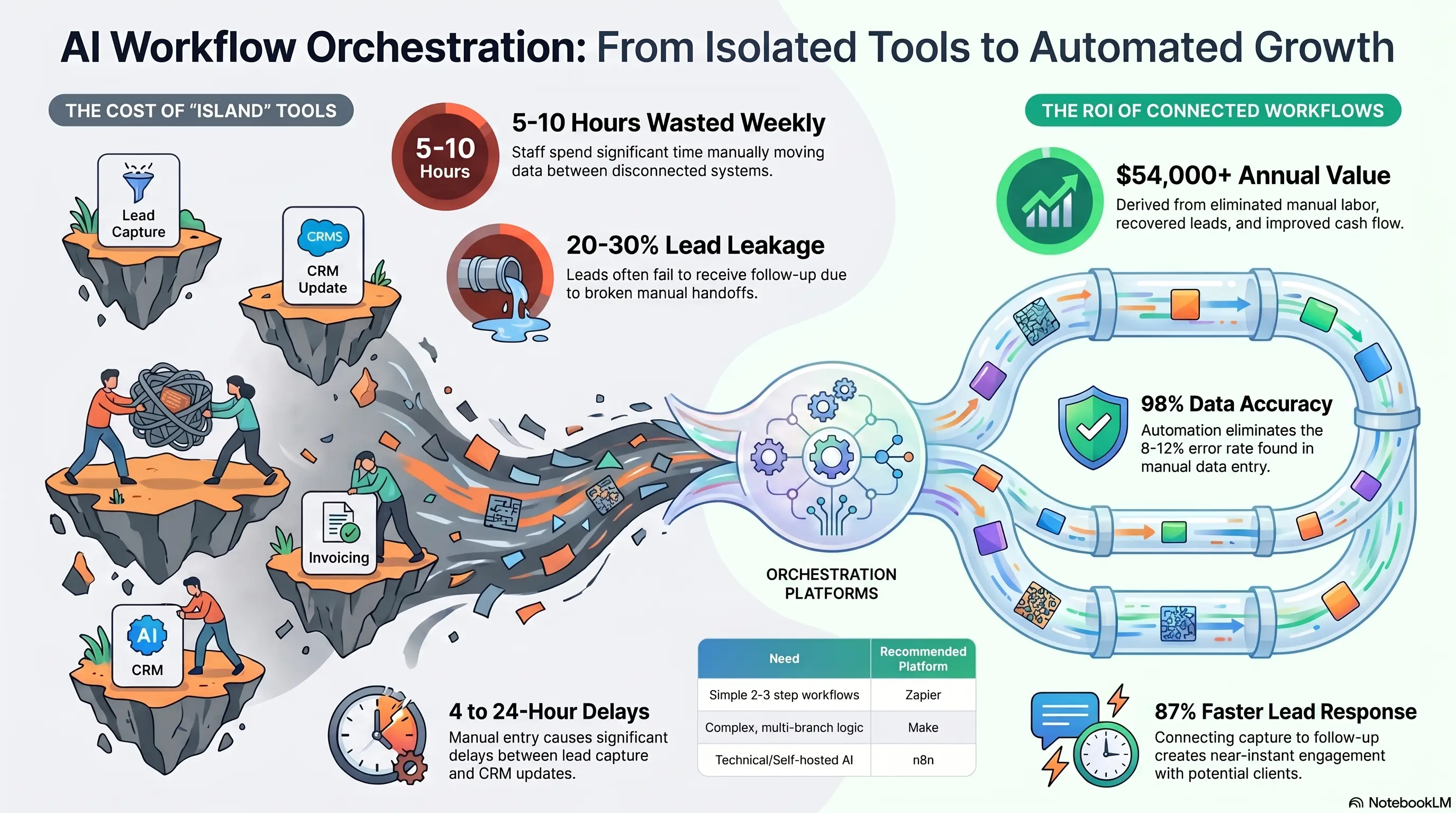
You have an AI chatbot on your website. A transcription tool for meetings. An email platform. A CRM. An invoicing system.
Each tool works fine alone. Together, they're islands—and your team is the ferry, manually moving data between them.
Workflow orchestration connects your AI tools into chains: lead captured → CRM updated → welcome email sent → task assigned → invoice generated when the job closes. No copy-paste. No "did someone update the CRM?" No leads falling through cracks between systems.
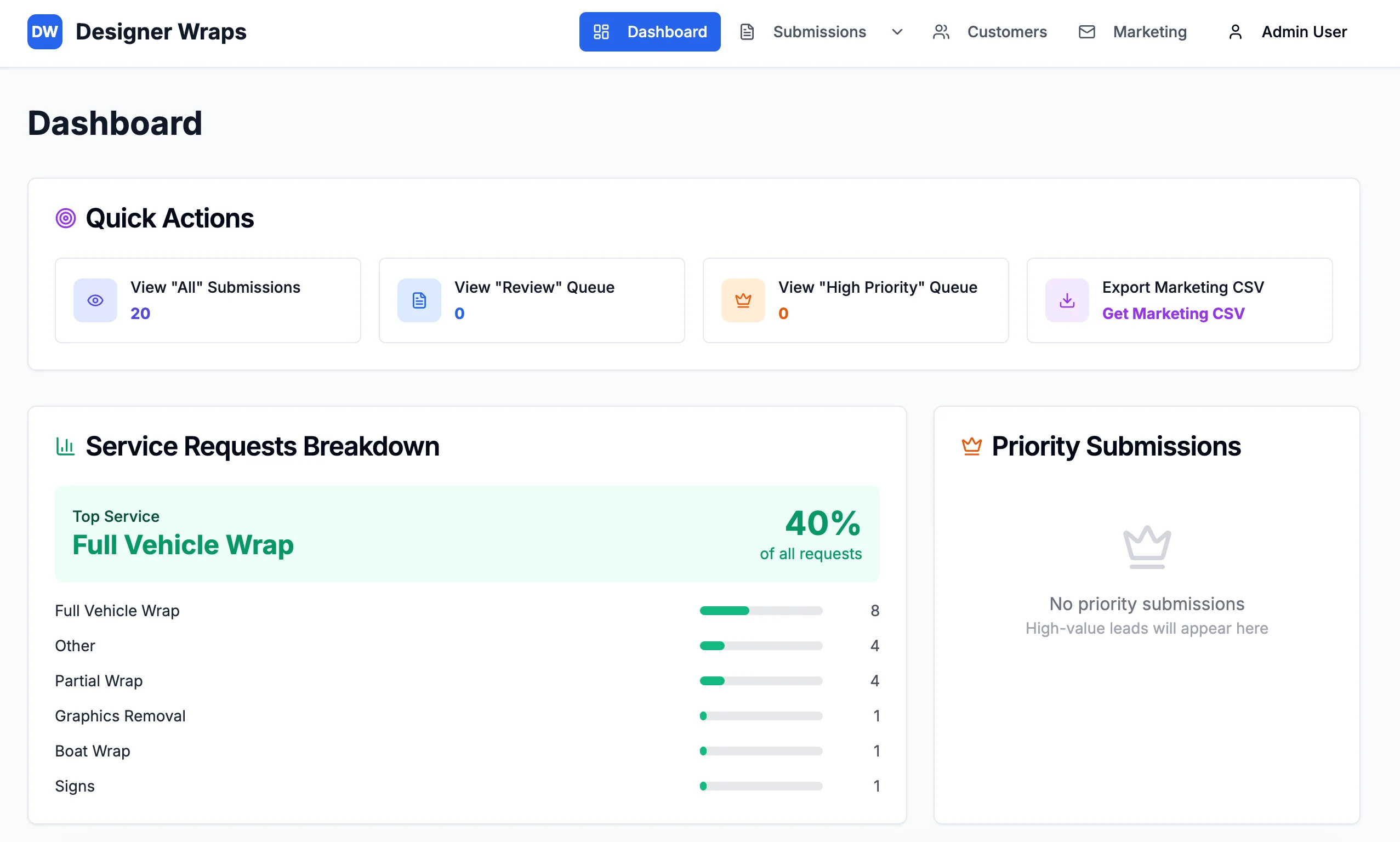
Designer Wraps achieved 87% faster lead response by connecting capture to follow-up in one flow. This guide shows service businesses how to orchestrate AI tools with n8n, Zapier, and Make—and when to graduate from no-code to custom integration.
🏝️ The Islands Problem: Great Tools, Zero Connection
Most service businesses accumulate tools faster than they connect them.
The Typical Stack (Disconnected):
- Website form or AI chatbot for lead capture
- CRM for contact management
- Email platform for sequences
- Calendar for booking
- Accounting software for invoicing
- Project management for delivery
- AI tools for drafting, transcription, or analysis
What Happens Without Orchestration:
- Lead submits form → sits in inbox until someone manually enters CRM (4-24 hour delay)
- Sales sends proposal → no automatic follow-up task created
- Deal closes → onboarding email sent manually, invoice created days later
- Meeting happens → notes typed from memory, action items lost
The Hidden Cost: Staff spend 5-10 hours weekly moving data between systems—work that adds zero customer value.
Lead Leakage: 20-30% of leads never get proper follow-up because the handoff between capture and CRM fails silently.
Warning Sign: If your team asks "did this get entered into the CRM?" more than once a week, you have an orchestration problem—not a people problem.
🔗 Example Chains: Lead → CRM → Email → Invoice
Orchestration turns multi-step processes into single automated flows.
Chain 1: New Lead to Qualified Opportunity
- Form submission or AI chatbot captures lead details
- CRM contact and deal record created automatically
- Lead scored based on form answers (budget, timeline, service type)
- Hot lead → SMS alert to sales rep
- Warm lead → enters 5-day nurture email sequence
- Follow-up task created with 24-hour SLA
Chain 2: Deal Closed to Delivery Started
- CRM deal marked "Won" triggers workflow
- Welcome email with onboarding portal link sent instantly
- Internal tasks assigned to account manager and delivery team
- Project record created in management system
- Client added to billing system
Chain 3: Job Complete to Payment Received
- Team marks job complete in project system
- Invoice generated from job record (no re-typing)
- Invoice emailed with payment link
- Payment reminder sequence at 7 and 14 days if unpaid
- Payment received → CRM updated, thank-you email sent
Chain 4: Meeting to Follow-Up
- AI transcription captures meeting audio
- Summary and action items extracted automatically
- CRM tasks created for each action item
- Follow-up email draft generated for human review and send
The Result? Each chain eliminates 3-5 manual steps and ensures nothing falls through the cracks between tools.
⚖️ Platform Comparison: n8n vs Zapier vs Make
Zapier (Best for Beginners):
- 5,000+ app integrations out of the box
- Visual builder, no code required
- Pricing: $20-600/month based on task volume
- Best for: Simple 2-3 step workflows, non-technical teams
- Limitation: Complex logic and branching gets expensive quickly
Make (Best for Visual Complex Flows):
- Strong visual builder with advanced routing
- Better pricing at higher volumes than Zapier
- Pricing: $9-300/month
- Best for: Multi-branch workflows with conditional logic
- Limitation: Steeper learning curve than Zapier
n8n (Best for Technical Teams & Self-Hosting):
- Open-source option with self-hosting for data control
- Cloud plans from $20/month
- Best for: Custom integrations, AI model connections, complex data transforms
- Limitation: Requires more technical comfort
Decision Matrix:
| Need | Platform | |------|----------| | First workflow, simple trigger→action | Zapier | | Multi-step with if/then logic | Make | | AI API integration + custom code | n8n | | Data must stay on your servers | n8n self-hosted | | Under 1,000 tasks/month | Any—all work fine |
Warning Sign: Don't choose based on features you'll never use. Start with the platform your team will actually maintain.
🔧 When to Use Custom Integration vs No-Code
No-Code Orchestration Works When:
- Standard apps with existing connectors (HubSpot, Gmail, Xero, Slack)
- Workflow logic is straightforward (if this, then that)
- Volume under 10,000 tasks/month
- Team can maintain workflows without developer support
- Budget under $500/month for platform fees
Custom Integration Makes Sense When:
- Proprietary or legacy systems without API connectors
- Complex business logic (multi-entity pricing, NDIS matching rules, custom approval chains)
- High volume where per-task pricing becomes prohibitive
- Real-time requirements (sub-second response, not batch processing)
- Data security requirements beyond what no-code platforms offer
The Hybrid Approach (Most Common): Use no-code for 80% of workflows. Custom code for the 20% that no-code can't handle—connected via webhooks and APIs.
Ecardz Model: Custom Order Management System for quote-to-cash complexity, with standard integrations for email and accounting. Not everything needs custom—but core revenue workflows often do.
The Result? Most service businesses should start no-code, prove ROI on 2-3 chains, then invest in custom integration only where no-code hits limits.
💰 ROI: What Connected Workflows Deliver
Investment:
- No-code platform setup: $0-500 (self-serve) to $2,000-5,000 (configured)
- First 3 workflow chains: 1-2 weeks to build and test
- Ongoing platform cost: $20-200/month
Annual Returns:
Manual data transfer eliminated: 5 hrs/week × $35/hr × 52 weeks = $9,100/year
Lead follow-up recovery: Recover 15-20% more leads from automated CRM entry and task creation. On 50 leads/month × $500 avg = $45,000-60,000/year
Faster invoicing → improved cash flow: Automated invoice generation reduces payment delay by 7-14 days. On $30,000/month revenue = significant cash flow improvement.
Error reduction: Manual CRM entry errors affect 8-12% of records. Automation achieves 98%+ accuracy (Dinamiq's standard).
Total annual value: $54,000-70,000+ for active service businesses
Payback period: 1-3 months
Warning Sign: Calculate ROI on lead recovery, not just time saved. One recovered deal per month often covers the entire platform cost.
🚀 Your First Workflow to Build
Don't try to connect everything at once. Start with the highest-leakage handoff.
The First Workflow Formula:
Trigger: Something happens (form submit, deal won, job complete, meeting ends)
Action 1: Update your system of record (CRM, project tool, accounting)
Action 2: Notify the right person (email, SMS, Slack)
Action 3: Start the next step (email sequence, task, invoice)
Recommended First Workflows by Business Type:
Consultants/Agencies: New inquiry form → CRM contact + deal → assign to sales rep → send acknowledgment email
Trades/Field Service: Job request → CRM record → SMS to dispatch → confirmation to customer
Healthcare: Appointment booked → CRM update → reminder sequence scheduled → intake form sent
Professional Services: Meeting ends → transcription summary → CRM tasks created → follow-up draft emailed to rep
Build Checklist:
- Map current manual steps (every click, copy, paste)
- Identify the trigger event
- List required data fields at each step
- Build in test mode with fake data
- Run 10 real transactions before going live
- Monitor for 2 weeks, fix edge cases
The Result? Businesses that connect their first workflow within 2 weeks typically add 2-3 more chains within 60 days—because the ROI is immediately obvious.
💡 See These Strategies in Action
Real businesses, real results. Explore how companies implemented these concepts:
Key Takeaways
Quick wins and actionable insights from this guide:
- Disconnected AI tools create islands—staff spend 5-10 hours weekly ferrying data between systems
- Orchestration chains connect lead capture, CRM, email, invoicing, and follow-ups into single automated flows
- Zapier for simple workflows, Make for complex branching, n8n for custom AI integrations and self-hosting
- Start no-code for 80% of workflows; invest in custom integration only where no-code hits limits
- Connected workflows recover 15-20% more leads and deliver $54,000+ annual value with 1-3 month payback
- Build your first workflow on the highest-leakage handoff—usually form submit to CRM to follow-up task
AI 101 Services Team
Business Automation Specialists
AI 101 Services helps service businesses implement AI automation solutions that deliver measurable ROI. With 21+ solutions delivered and 15+ clients served, we specialize in turning manual chaos into streamlined digital workflows.