Your AI chatbot handles FAQs fine. Then a customer asks about pricing, wants to book an appointment, and needs to know their invoice status—all in one conversation.
The chatbot breaks. Or worse, it confidently gives wrong answers because one general-purpose agent can't be an expert at everything.
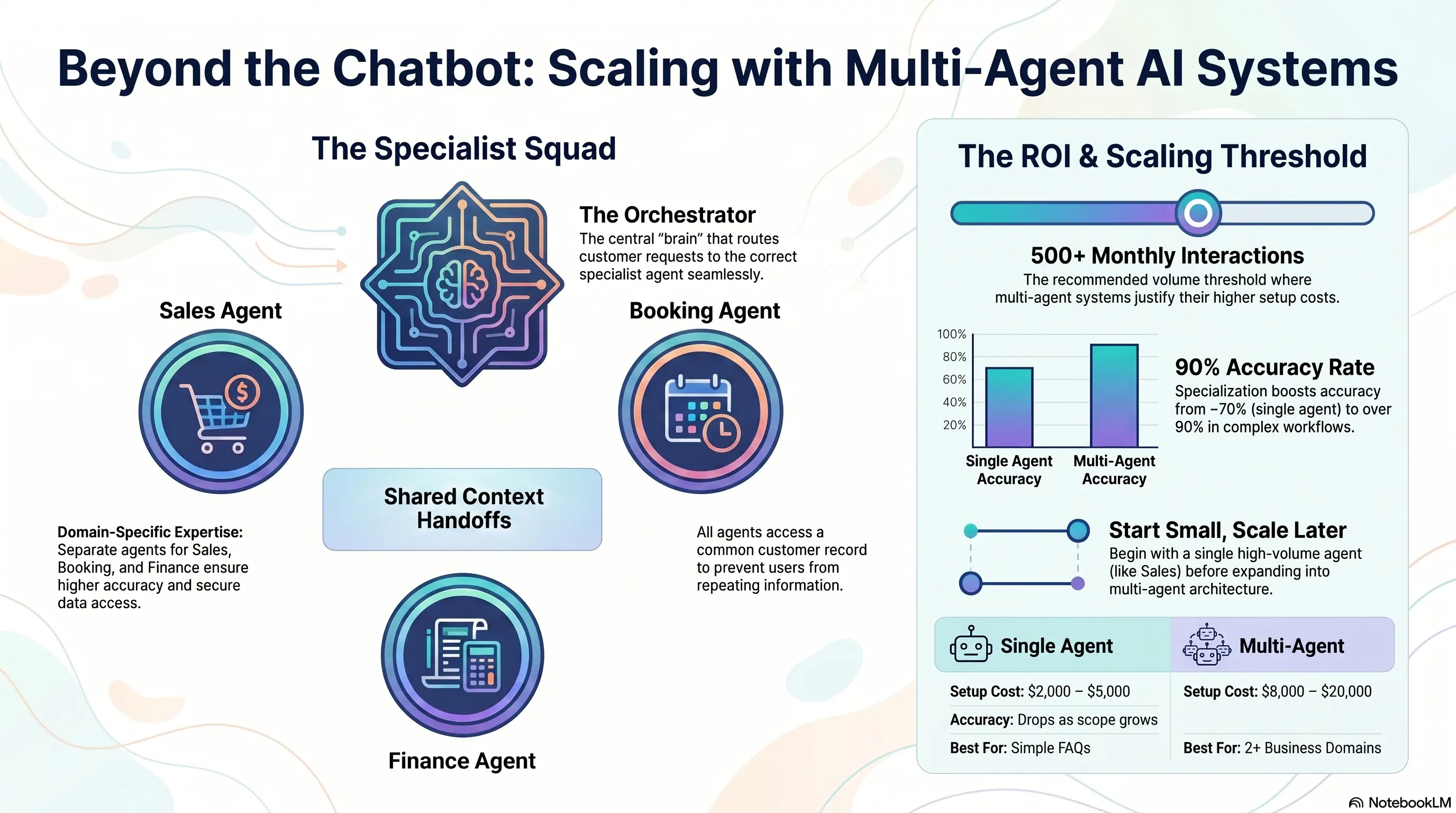
Multi-agent AI systems solve this by deploying specialized agents—sales, booking, finance, support—each expert in their domain, coordinated by an orchestrator that routes requests to the right specialist.
This isn't science fiction. Service businesses with complex customer journeys are already deploying multi-agent architectures to handle what single automations can't. This guide explains when you need multiple agents, how they work together, and how to build your first multi-agent system.
🤖 Why Single Automations Hit Their Limits
Single-purpose automation works until customer needs span multiple domains.
Where Single Agents Fail:
Scope creep: One chatbot asked to handle sales, support, booking, and billing becomes mediocre at all four.
Context loss: Customer discusses pricing (sales), then asks to book (scheduling), then queries an invoice (finance). Single agent loses thread or gives inconsistent answers.
Integration complexity: One agent connecting to CRM, calendar, accounting, and support systems creates fragile, monolithic configuration.
Security boundaries: Finance agent needs access to payment data. Sales agent doesn't. Single agent creates over-permissioned access.
The Threshold: If customer interactions regularly cross 2+ business domains (sales + booking, support + billing), single-agent architecture struggles.
Warning Sign: If you're constantly expanding one chatbot's script to handle "one more thing," you've outgrown single-agent design.
🎯 Specialized Agents: Sales, Booking, Finance, Support
Multi-agent systems assign expertise by domain.
Sales Agent:
- Qualifies leads (budget, timeline, service fit)
- Answers pricing and service questions
- Creates CRM records and deal stages
- Hands off to booking when customer ready
Booking Agent:
- Checks calendar availability
- Schedules appointments with correct duration and provider
- Sends confirmations and reminders
- Handles rescheduling and cancellation
Finance Agent:
- Retrieves invoice status and payment history
- Explains charges and payment options
- Initiates payment links
- Escalates disputes to human accounts team
Support Agent:
- Answers FAQ and troubleshooting
- Tracks job/service status
- Creates support tickets for issues
- Escalates complex problems to human team
Orchestrator Agent: Routes incoming requests to the right specialist. Customer doesn't choose—they just ask, and the orchestrator decides.
Example Flow: "I got a quote last week and want to book, but I have a question about the invoice deposit." → Orchestrator routes to Sales (quote lookup) → Booking (schedule) → Finance (deposit explanation)—seamlessly.
The Result? Each agent stays focused, accurate, and maintainable—instead of one bloated system doing everything poorly.
🔗 How Agents Coordinate: Handoffs and Shared Context
Multi-agent power comes from coordination, not isolation.
Shared Context Layer: All agents access common customer record:
- Contact details and history
- Current deal/opportunity status
- Upcoming appointments
- Open invoices and payment status
- Previous conversation summaries
Handoff Protocols: When one agent reaches its boundary:
- Summarize conversation context
- Pass to next agent with full history
- Next agent continues without customer repeating information
Technical Implementation:
- Shared CRM/database as source of truth
- Message bus or workflow platform (n8n, custom API) for agent communication
- Session ID linking all agent interactions to one customer journey
Human Escalation: Every agent needs clear escalation triggers:
- Customer requests human
- Sentiment detection (frustration, confusion)
- Request outside all agent capabilities
- High-value opportunity (enterprise deal, complaint from VIP)
Warning Sign: If customers repeat themselves when transferred between agents, your context sharing is broken.
📊 When Multi-Agent Makes Sense vs Overkill
Multi-Agent Is Worth It When:
- Customer journeys regularly span sales, booking, and support in one interaction
- You have 500+ customer interactions monthly across channels
- Single chatbot accuracy has dropped below 80% due to scope expansion
- Different domains require different system integrations and permissions
- Team spends significant time on cross-domain inquiries
Single Agent Is Fine When:
- Customer needs are simple and single-domain (FAQ, basic booking)
- Volume under 200 interactions/month
- One integration point (just CRM, or just calendar)
- Team can maintain one script without constant expansion
The Progression Path:
- Start with single agent for highest-volume use case
- Measure where it fails or gets expanded beyond original scope
- Split failing domains into specialized agents
- Add orchestrator when 2+ agents need coordination
Don't Start Multi-Agent: Building multi-agent before proving single-agent ROI is Mistake #1 from our automation mistakes guide—too much, too soon.
The Result? Most businesses should master single-agent automation first, then evolve to multi-agent when clear domain boundaries emerge.
💰 ROI: Multi-Agent vs Single Agent Costs
Single Agent Costs:
- Setup: $2,000-5,000
- Monthly: $100-300
- Maintenance: Low (one script, one integration set)
Multi-Agent Costs:
- Setup: $8,000-20,000 (orchestrator + 2-4 specialized agents)
- Monthly: $300-800 (multiple AI API calls, orchestration platform)
- Maintenance: Moderate (multiple agents to update independently)
When Multi-Agent ROI Justifies Cost:
Accuracy improvement: Single agent at 70% accuracy → multi-agent at 90%+. On 1,000 interactions/month, 200 fewer failures requiring human intervention.
Human escalation reduction: If each escalation costs 5 minutes of staff time: 200 × 5 min × $35/hr = $583/month saved
Cross-sell and conversion: Sales agent seamlessly handing to booking converts 15-25% more inquiries to appointments.
Payback period: 4-8 months for businesses at sufficient volume.
Warning Sign: Don't invest in multi-agent architecture for problems a better single-agent script would solve.
🚀 Building Your First Multi-Agent System
Phase 1: Prove Single Agent (Month 1-2)
- Deploy one agent for primary use case (lead capture or booking)
- Measure accuracy, escalation rate, customer satisfaction
- Document where single agent fails
Phase 2: Split First Specialist (Month 3)
- Extract the second-most-requested domain into specialized agent
- Connect via orchestrator with shared CRM context
- Run both agents, measure improvement on split domain
Phase 3: Add Orchestrator Logic (Month 4)
- Build routing rules: keywords, intent detection, conversation stage
- Test handoffs with real customer scenarios
- Refine escalation triggers
Phase 4: Expand & Optimize (Month 5+)
- Add additional specialists based on documented failure patterns
- Optimize orchestrator routing accuracy
- Build analytics dashboard across all agents
Start With Two Agents: Sales + Booking is the most common and highest-ROI pair for service businesses. Add Finance and Support agents only when volume justifies them.
The Result? Service businesses that evolve to multi-agent systems handle 2-3x more complex customer journeys without proportional human staffing—while maintaining accuracy that single agents can't achieve at scale.
Key Takeaways
Quick wins and actionable insights from this guide:
- Single AI agents fail when customer needs span sales, booking, finance, and support in one journey
- Specialized agents (sales, booking, finance, support) coordinated by an orchestrator deliver higher accuracy
- Shared context and seamless handoffs prevent customers from repeating information between agents
- Start with single agent, evolve to multi-agent when accuracy drops below 80% due to scope creep
- Multi-agent setup costs $8,000-20,000—justify with volume (500+ interactions/month) and escalation reduction
- Begin with Sales + Booking pair, add specialists only when documented failure patterns demand them
AI 101 Services Team
Business Automation Specialists
AI 101 Services helps service businesses implement AI automation solutions that deliver measurable ROI. With 21+ solutions delivered and 15+ clients served, we specialize in turning manual chaos into streamlined digital workflows.