NDIS audits don't fail because providers don't care about quality. They fail because evidence is scattered across folders, inboxes, and people's memories—assembled in a panic the week before auditors arrive.
Compliance admin routinely consumes 15-25 hours weekly for mid-size providers: progress notes, incident logs, worker credentials, consent forms, and service agreements that must stay current.
Automation doesn't replace clinical judgment. It captures evidence at the point of service, flags gaps before they become findings, and keeps an audit trail that doesn't depend on one stressed coordinator.
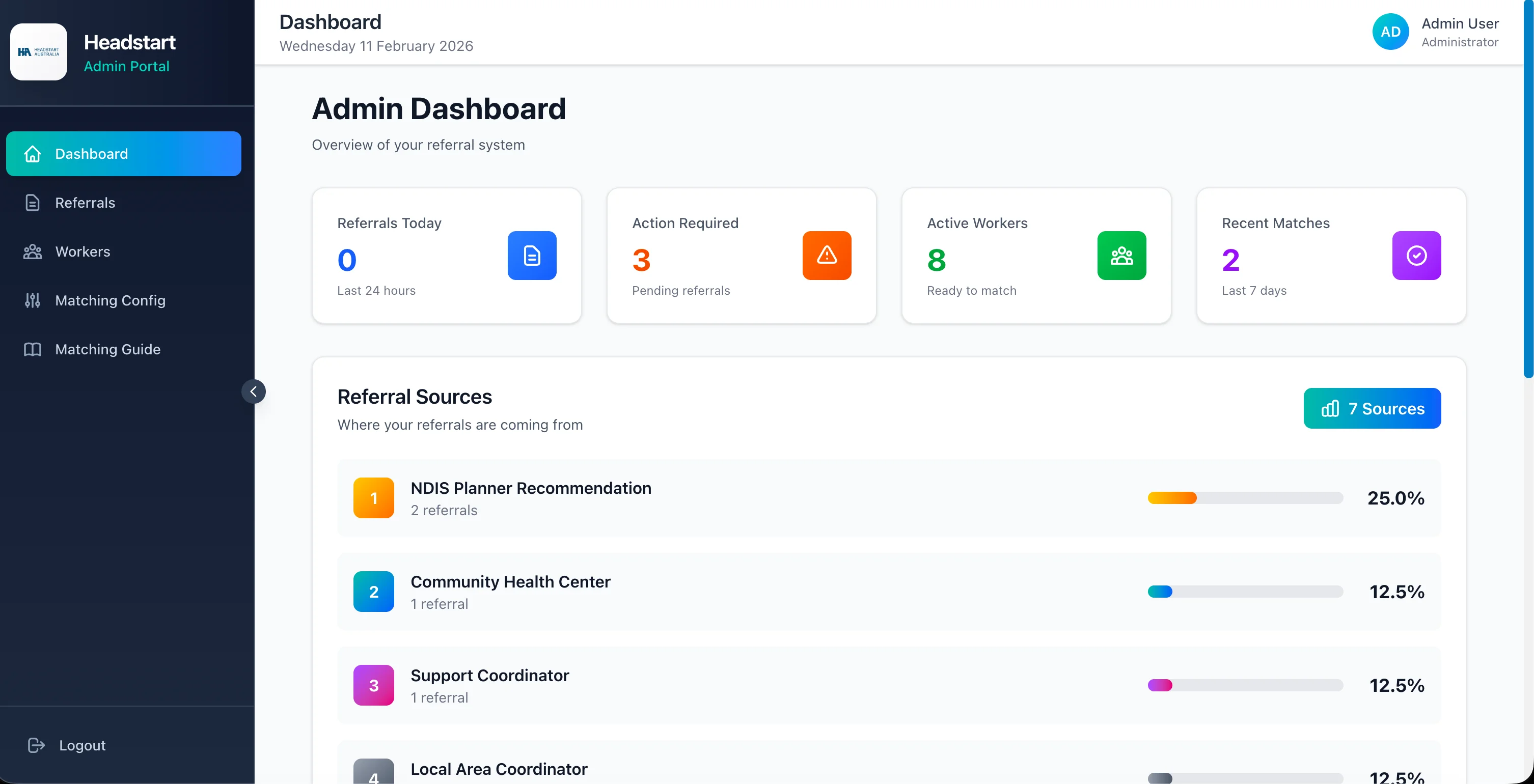
HeadStart Australia automated worker matching from 2-3 days to 2-5 minutes. The same systems thinking applies to compliance: structure the workflow, then let software enforce it. This guide shows NDIS providers how to become audit-ready every day—not just audit week.
📋 Why NDIS Compliance Admin Explodes
Compliance work multiplies with every participant and worker—not linearly with revenue.
High-Volume Documentation:
- •Progress notes and service records per shift
- •Incident and complaint registers
- •Worker screening, qualifications, and renewal dates
- •Participant consents, plans, and goal reviews
- •Service agreements and variation tracking
The Manual Reality:
- •Notes written days later from memory (quality and compliance risk)
- •Credential expiries tracked in spreadsheets that go stale
- •Evidence for audits pulled from email threads at 11 PM
- •Different coordinators using different templates
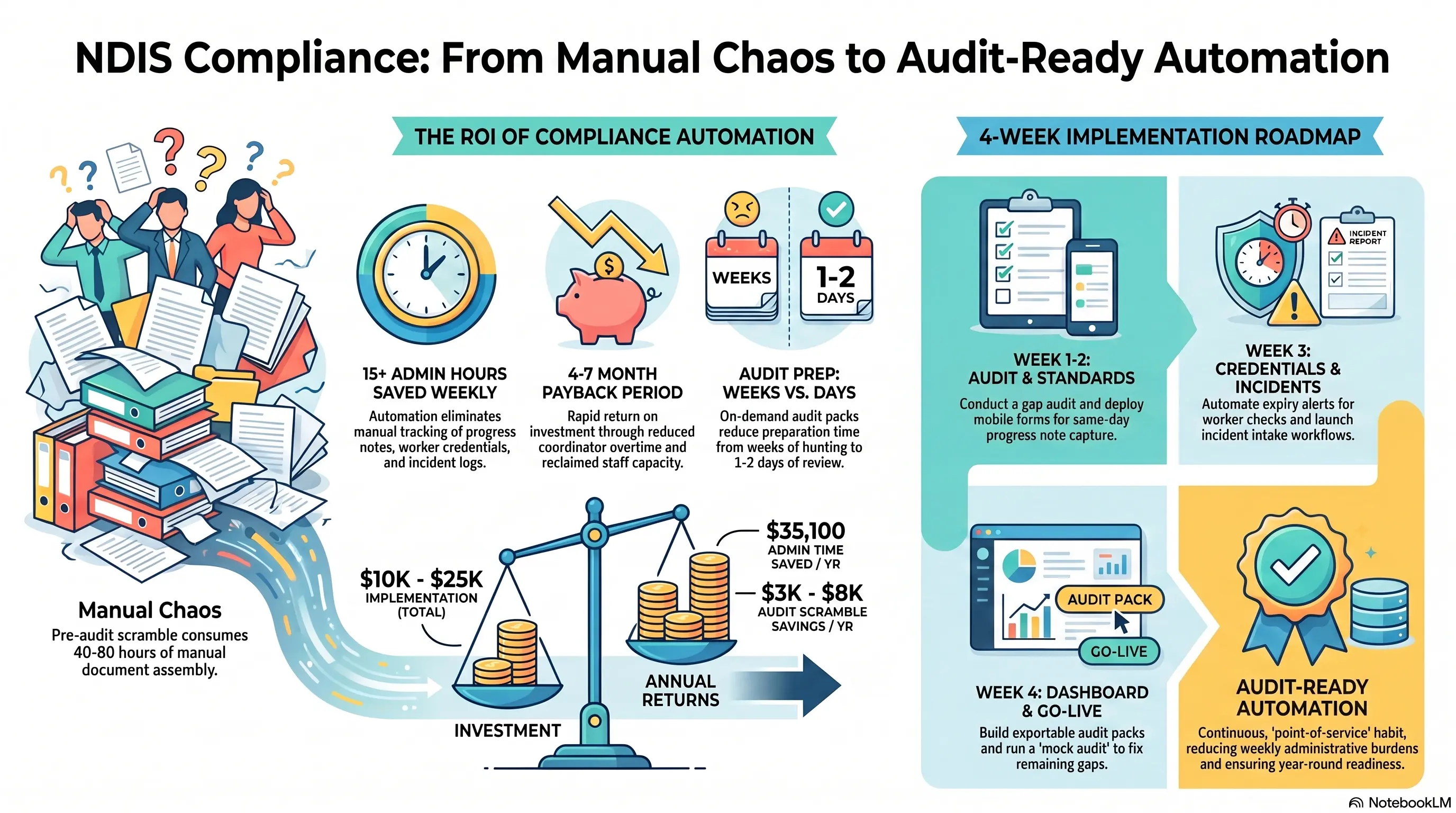
Audit Pain Pattern: Providers spend 40-80 hours in pre-audit scramble assembling documents that should have been complete at the time of service.
Warning Sign: If "getting ready for audit" is a project instead of a report you can export, your compliance process is reactive—not controlled.
✅ Automate Evidence Capture at Point of Service
The best compliance record is created when the service happens—not reconstructed later.
Point-of-Service Capture:
- •Mobile forms for progress notes before shift close-out
- •Required fields enforced (goals addressed, participant voice, next actions)
- •Photo or attachment upload where appropriate
- •Timestamp and worker identity locked to the record
Why Timing Matters: Notes completed within 2 hours of service are more accurate and audit-defensible than notes written Friday for Monday–Thursday shifts.
HeadStart Parallel: Matching automation only works because availability and credentials are structured data. Compliance automation needs the same: structured notes, not free-text chaos in personal notebooks.
Quality + Compliance Together: Good note prompts improve support quality (clear goals, participant outcomes) while satisfying documentation standards. It's not bureaucracy—it's better care with a paper trail.
The Result? Providers who enforce same-day notes cut retrospective documentation time by 50-70% and show cleaner audit evidence.
🎓 Worker Credentials and Expiry Alerts
One expired check can stop a roster—and create a compliance finding.
Credential Automation:
- •Central register: WWCC, police check, first aid, NDIS orientation, role-specific tickets
- •Expiry alerts at 90 / 60 / 30 days to worker and coordinator
- •Block scheduling for workers with critical expired credentials
- •Onboarding checklist that can't mark "active" until required docs uploaded
Incident & Complaint Workflows:
- •Standard intake form with severity routing
- •Automatic escalation for reportable incidents
- •Reminder tasks until investigation closed
- •Immutable log of actions taken (who, when, what)
Warning Sign: If you discover expired credentials only when building next week's roster, you need automated expiry monitoring—not another spreadsheet tab.
📦 Audit Packs on Demand
Audit readiness means exporting evidence in minutes, not hunting for weeks.
What an Audit-Ready System Provides:
- •Participant file pack: agreements, consents, goals, recent notes, incidents
- •Worker file pack: credentials, training, supervision records
- •Policy acknowledgment logs
- •Service delivery vs roster reconciliation reports
Continuous Compliance Dashboard:
- •% of notes completed same day
- •Open incidents past SLA
- •Credentials expiring in 30 days
- •Missing consents or unsigned agreements
Practice Audits Quarterly: Run an internal "mock audit" export every quarter. Fix gaps while they're small. Real audits then become confirmation—not discovery.
The Result? Providers with on-demand audit packs report pre-audit prep dropping from weeks to 1-2 days of review—not document assembly.
💰 ROI of NDIS Compliance Automation
Investment:
- •Compliance workflow + forms platform: $8,000-20,000
- •Credential tracking and integrations: $2,000-5,000
- •Timeline: 4-6 weeks
Annual Returns:
Admin time saved: 15 hrs/week × $45/hr × 52 = $35,100/year
Reduced audit scramble overtime: $3,000-8,000/year
Risk reduction: Avoided findings, remediation projects, and reputation damage (hard to price—easy to regret)
Coordinator capacity: Same team supports more participants without proportional admin hiring
Payback period: 4-7 months
Warning Sign: Calculate ROI on coordinator hours and audit risk—not software features. The goal is continuous readiness, not a prettier folder structure.
🚀 4-Week Compliance Automation Launch
Week 1: Gap Audit - List every document type auditors request - Score each: complete, partial, or tribal knowledge - Prioritize progress notes + credential expiry (highest volume risk)
Week 2: Note & Form Standards - Finalize required note fields with clinical leads - Deploy mobile note capture with same-day completion rule - Train workers on the new close-out habit
Week 3: Credentials & Incidents - Import worker credentials with expiry dates - Turn on alert and scheduling blocks - Launch incident intake workflow with escalation paths
Week 4: Audit Pack & Dashboard - Build export packs for participant and worker files - Launch compliance dashboard for leadership - Run first mock audit and fix gaps
The Result? Providers typically cut compliance admin by 40%+ within 60 days while improving evidence quality for real audits.
💡 See These Strategies in Action
Real businesses, real results. Explore how companies implemented these concepts:
Key Takeaways
Quick wins and actionable insights from this guide:
- NDIS compliance fails more often from scattered evidence than from poor care intent
- Capture progress notes at point of service—same-day notes are more accurate and audit-ready
- Automate credential expiry alerts and block scheduling when critical checks lapse
- On-demand audit packs turn prep from weeks of hunting into days of review
- Expect 15+ hours weekly admin relief with payback typically in 4-7 months
- Start with notes and credentials, then incidents, then full audit-pack exports
AI 101 Services Team
NDIS Automation Specialists
AI 101 Services helps service businesses implement AI automation solutions that deliver measurable ROI. With 21+ solutions delivered and 15+ clients served, we specialize in turning manual chaos into streamlined digital workflows.